



The video shows an attractive kitchen, a bright living room, and a bedroom with a neatly made bed. A prospective renter watches it twice and still cannot tell whether the kitchen opens into the living room or sits at the other end of the hall. Every room has appeared. The property remains difficult to understand.
A rental walkthrough has a different job from a highlight reel. It should help someone build a workable picture of the space before deciding whether to arrange a visit. Decorative details can support that picture, but they cannot replace the connections between rooms. Plan those connections while writing the shoot, rather than hoping they survive the edit.
Decide Whether Viewers Need A Route Or Highlights
A short social clip might introduce the kitchen and invite viewers to see a fuller tour. It does not need to explain every doorway. A video presented as a walkthrough creates a different expectation: the viewer should be able to follow where the camera goes and understand how the main spaces relate.
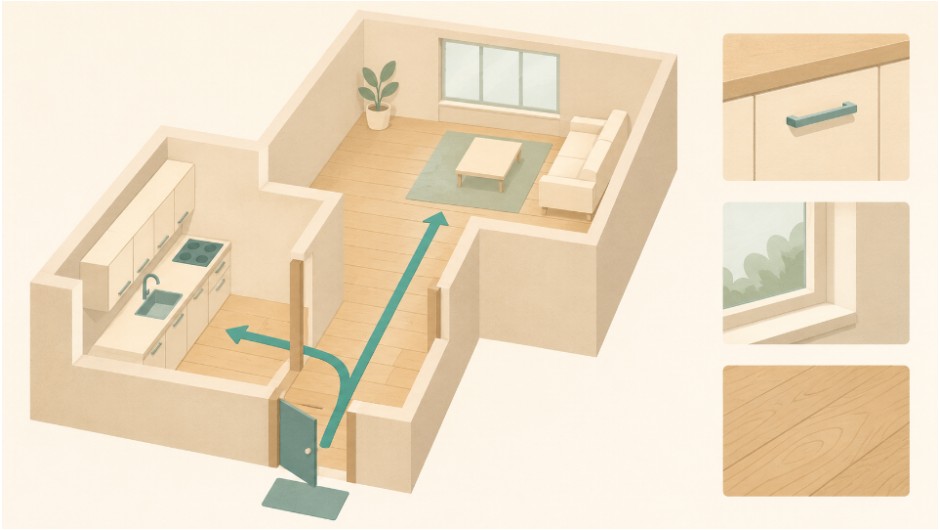
Consider a hypothetical rental with an entrance hall, a kitchen to one side, and a living room beyond. The footage can be arranged in several ways. A continuous route establishes the connections. Separate room shots can provide clearer views inside each space. A montage of handles, windows, and surfaces can emphasize finish but gives very little help with orientation.
Video approach | What it explains well | What it may leave unclear |
Route through connected rooms | How the main spaces connect | Details missed during movement |
Separate room views | The appearance of each room | Where rooms sit relative to one another |
Decorative detail montage | Materials and selected finishes | The route and overall arrangement |
Choose the approach according to the video's promise. A montage can work as an introduction if a fuller explanation is available elsewhere. For the walkthrough itself, include enough of the route that viewers do not have to infer a floor plan from unrelated shots.
When using AI Screenwriting Software to plan the sequence, treat the script as an account of real footage you intend to capture. It can record an entrance, a turn, and the room revealed beyond. It should not fill missing coverage with an invented doorway or a description copied from a different property.
Keep The Connecting Doorways In The Shot Plan
Small transitions often carry more spatial information than another wide view of a room. A moment at the kitchen doorway can show the hall behind the camera's path. A turn toward the living room can explain that the two spaces are adjacent. Removing those moments may make a video brisker while leaving viewers less certain where they are.
Begin from a place viewers can recognise when the route returns to it. That might be just inside the entrance, with a visible hall and the first doorway. You do not need to show the exterior address or include private belongings to establish the starting point. One clear view of the relevant circulation space can be enough.
In the hypothetical property, the camera enters the hall, turns toward the kitchen, then returns far enough to show the route into the living room. Write those moves before filming. If the videographer finds a better path on site, update the plan so the editor knows which shot actually establishes the connection.
Preserve A Landmark When Cutting Between Rooms
A doorway, window, or distinctive section of wall can orient viewers across a cut. Show it in the departing view and let it remain recognisable in the next one. The landmark does not need to be a focal point. It provides enough continuity that the viewer can connect two otherwise separate images.
Laper derives scene and location information from screenplay headings, which can help organise a plan around the actual rooms being filmed. Use consistent names for the entrance hall, kitchen, and living room. The location organisation does not generate or verify a floor plan; someone still has to check the route against the property.
If the route requires passing through one room to reach another, show that relationship plainly. A cut that skips the intermediate room may suggest a separate corridor. The goal is to explain the layout that exists, even when the arrangement is less tidy than a sequence of isolated wide shots would imply.
Write Narration Only Where The Image Needs Help
Once the route is clear, narration can stay modest. “The kitchen is off the entrance hall” explains a connection. “Discover a beautifully flowing home” adds praise without helping the viewer locate anything. Prefer a short, verifiable description of what the footage is about to show.
Be careful with camera-dependent impressions. A wide view can make a room look generous without establishing its dimensions. If measurements matter, use verified property information rather than estimating from the image. The walkthrough's account of the rooms should agree with the current listing and the space the viewer would encounter on a visit.
For a transition drafted in Laper, supply the confirmed route and request simpler wording for that selected scene or passage. “Return to the hall, then enter the living room” is enough if the footage establishes each move. Reject any added feature, room connection, or measurement that was not in the source information. An assistant can make a sentence fluent without knowing the building.
Keep the footage and narration paired during review. If the line says the kitchen is on the left but the edit has reversed the approach, fix the mismatch. Do not assume viewers will reconstruct the filming direction. Relative descriptions are useful only when their reference point remains clear.
Try To Reconstruct The Route From The Rough Cut
Watch a rough sequence without consulting the property notes. Sketch the entrance, the kitchen, and the living room as simple boxes. You are checking whether the video communicates their connections, not creating a measured plan. A missing connection points to a specific coverage or editing problem.
Then remove the decorative close-ups and watch again. If the route becomes easier to follow, decide where those details can return without interrupting orientation. They might fit after the room has been established, rather than between the doorway and the first wide view inside it.
A person unfamiliar with the property can also review the cut. Ask them to describe the route before explaining it yourself. Keep their first sketch, then compare it with the actual route. A correct room name on the wrong side of the hall points to a different problem from a room they never noticed at all.
When the reviewer places the kitchen on the wrong side of the hall, inspect the transition that led them there. You may need a brief return to the starting position, a different connecting shot, or a clearer line. Another attractive image of the kitchen will not necessarily answer the question.
Make The Tour A Useful Preview Of A Visit
A route-led walkthrough suits a property whose connections need explaining. Laper can help organise that plan, while a short highlight montage may serve a separate promotional purpose. Make the video's label match the account of the property it actually provides.
The useful result is straightforward: a viewer can describe how the main rooms connect and identify what they still want to see in person. The decorative shots then become details within an understandable space, rather than clues from which a prospective renter has to assemble the property alone.