



How to Recover Deleted Tenant Documents?
Losing Tenant documents like rental agreements, rent receipts, inspection reports, etc. is distressing. Such loss can cause more problems when you need them for a landlord dispute, tax records, legal purposes, or future reference. Fortunately, you can easily recover deleted tenant documents, often without paying any cost.
Before trying free data recovery software or contacting a data recovery service, explore some built-in recovery methods. You can go with workarounds like restoring from the Recycle Bin, cloud storage, backups, previous file versions, and email attachments to recover your lost files back. Let us browse these data recovery workarounds in detail.
What Are Tenant Documents?
Tenant documents are records generated or used in the course of a tenant-landlord relationship. These records can be saved on a computer, phone, hard drive, cloud-computing system, or even on an email account.
Examples of tenant documents include:
- Rental/lease agreements
- Rent payment slips
- Security deposit documentation
- Inspection reports at move-in/move-out
- Photographs of the property
- Maintenance requests
- Correspondence between the landlord and the tenant
- Utility bill documents
- Insurance papers
- Termination notices
- Identification documentation
- Payment receipts
- Inventory list of the property
Some of these documents have personal, financial, or legal significance. Hence, it’s important to retrieve them fast.
What To Do When You Find Tenants Document Deleted?
Before you proceed with any free data recovery software or DIY method to recover your tenant’s deleted documents, it’s important to explore the exact data loss reasons. Whether it’s accidental deletion or lost due to system formatting, virus attack, or any other reason, there’s always chance to restore your deleted rental documents.
Moreover, when you find such documents deleted from your device, it’s important to immediately stop saving new files on the drive. Continuous usage may make the recovery complex, as new data can overwrite your deleted document.
Also, avoid formatting the drive, as this can also make recovery complex. If you are planning to restore deleted files using third-party data recovery software, don’t install it on the affected drive. Once you are done with these precautions, start with quick recovery methods.
01: Recover Deleted Tenant Documents from the Recycle Bin
The Windows Recycle Bin is the first place that you should check if you accidentally deleted a tenant document. If file deletion is normal, your file must go to the Recycle Bin rather than being immediately removed from the storage device. Here is how to recover deleted data from the Recycle Bin:
- Launch the Recycle Bin folder on your Windows computer.
- Browse through available deleted files.
- Search for the required tenant document using the file name.
- Right-click on it and select Restore.

This is the simplest recovery method and costs nothing.
02: Recover Documents from Google Drive
If you are good at maintaining cloud backups of your important data, your deleted tenant document might be present there. The other place where documents such as rental agreements, receipts, PDFs, and property documents can be found is in Google Drive.
Google keeps those deleted documents in this place for 30 days, after which they get permanently deleted. To recover files from Google Drive:
- Firstly, open your Google Drive, then click on "Trash."
- Identify your deleted document.
- Right-click on the file and select "Restore."
- Your document will be restored to its original place.
If you are using Google Workspace in an organisation, then there could be some extra recovery options for your Drive.
03: Recover Tenant Document Using Third-Party Free Data Recovery Software
In case your tenant document has been permanently deleted from your Windows computer or from your external storage device without any copies or backups, there are free data recovery software tools that you can consider using.
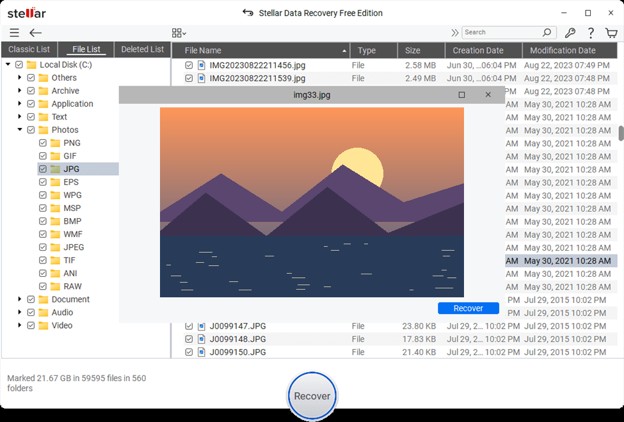
Data recovery software like Stellar Data Recovery Free checks the storage media for deleted files that may physically reside on the disk. These tools perform through scanning of your storage device to find recoverable files from various internal or external storage devices. You can use this tool to recover files from hard drives, USB drives, memory cards, and other supported media. However, the free version supports recovery of only up to 2 GB of files for free. To recover files of larger size, you need to upgrade to the premium versions.
Here’s how to recover tenant documents using the Stellar Data Recovery Free tool:
- Download and install the Stellar Data Recovery Free software from its official website on your Windows PC. Don’t install the recovery tool onto the disk where the deleted tenant document was earlier stored.
- Launch the software and, from the homepage, choose the file format of your deleted tenant documents. Click Next to continue.

- Now, click Scan to scan your device for deleted files. Wait till the scanning process is done. It usually takes a few minutes to hours depending on your file size.

- After the scan is done, preview the recoverable files and click Save to save your recovered files to another drive.
What Happens if the Tenant Document Was Permanently Deleted?
Permanent deletion does not necessarily mean that the information has disappeared from the storage medium at once. With standard hard drives, for instance, deleted file information might remain until it is overwritten. third-party free data recovery software can then help you find and restore such files.
But file recovery sometimes becomes complex if any of the following happens:
- The deleted file information has been overwritten by new information.
- The storage medium has been physically damaged.
- The drive has been formatted.
- The deleted file has been securely erased.
- The storage medium employs some special technology making it hard to recover deleted files.
That is why you need to stop using the relevant storage medium once you realise that its stored files are deleted.
Conclusion
Sudden deletion of rental agreement, rent receipt, inspection form, or any other important tenant document does not necessarily indicate its permanent loss. You can easily go with the aforementioned free data recovery workarounds like checking the Windows Recycle Bin, cloud trash, previously created backups, etc. to find recoverable files.
In case the file is permanently deleted and there is no backup copy of the document, you can use free data recovery software that will give you yet another chance to restore the document. However, the probability of restoration decreases when new data gets stored on the device where your file has been lost.
Most importantly, when your tenant documents have been restored, make sure you store several copies and make regular backups of your files. These backups will save you much time in case of unexpected data loss in the future.