



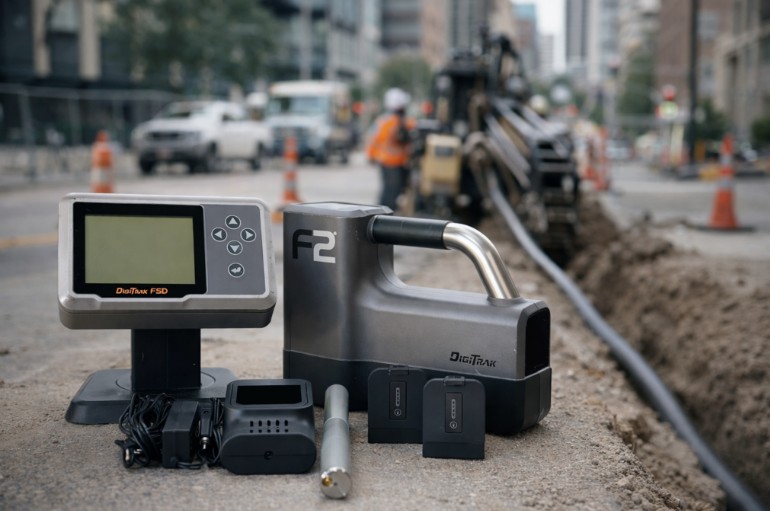
If your readings jump in the city, you fight background noise and distortion. If your depth looks wrong in mixed soils, you likely lost margin in signal-to-noise ratio. You can restore stable locating with a repeatable workflow, disciplined handling, and smarter frequency choices.
You may also need hardware. If your transmitter output feels weak or your signal drops below usable levels, replace the DigiTrak F2 transmitter before you risk a mismark. If you want a full system upgrade or a replacement receiver and transmitter set, browse UCG HDD’s refurbished DigiTrak F2 inventory here: https://ucghdd.com/collections/digitrak-f2.
What makes DigiTrak F2 readings unstable
Signal stability comes down to signal strength versus background noise. When the gap shrinks, your locator shows variable readings. Your front locate point drifts. Your predicted depth becomes unreliable.
Interference creates that gap problem in two ways. Operator technique can also mimic interference. Treat instability as a diagnostic problem and separate the cause before you change anything.
Active interference
Active interference comes from energized sources. It raises background noise and can create spikes that do not match transmitter movement. You see it near high-tension power lines, underground electric, telecom corridors, cable systems, traffic signal loops, radio transmitters, and cathodic protection. Active interference often affects a wider area and can change with time even when you stand still.
Passive interference
Passive interference comes from conductive structures that distort the field. Rebar reinforced concrete causes strong distortion near the surface. Chain link fence, guard rails, culverts, vehicles, large metal objects, and buried pipes can bend the locate line and pull energy sideways. Passive effects can increase coupling and bleed-off, which can shift marks toward an adjacent utility corridor. Passive interference tracks your position and often appears in narrow zones near metal.
Operator-driven instability
Technique can mimic interference. If you drag the locator or change height above ground between readings, you change the geometry and the result. That can look like noise even when the site stays quiet. Keep the locator off the ground. Keep height above ground consistent. Keep the coil plane consistent. If the crew changes stance or speed, treat that change as a possible cause before you blame the site or the transmitter.
Active vs passive interference in the field
Use simple field patterns to separate the causes. Active interference often changes with time. Background noise rises and falls while you stand still. You may see spikes even when the transmitter does not move. The display feels jumpy across a wide area, not just near one object.
Passive interference tracks your position near metal. You can walk in clean soil and get stable locate points. Then you step near rebar, a fence line, or a rail and the locate line bends. The front locate point shifts with small moves. Depth swings appear in a narrow zone that follows the metal.
Start with a walk of the planned bore path before you drill. If you can, scan with the transmitter off and note any unstable behavior. That points to active sources along the corridor. Then map visible passive risks such as reinforced slabs and long metal runs.
Do not guess. If the pattern looks active, focus on separation and frequency selection. If the pattern looks passive, focus on handling and repositioning. If both appear, expect mixed zones and plan to retest often.
Run fast checks before you drill
Crews lose time and accuracy when they skip the same five-minute checks. Use a repeatable pre-drill workflow. It reduces wrong depth, reduces mismarks, and improves production in high interference areas.
Start with a jobsite scan. Walk the bore path. Note sections with high background noise or spikes. Mark them as risk zones. Plan your steering decisions before you enter them. This step alone prevents surprise drift mid-shot.
Next, verify calibration in a clean area. Do not recalibrate inside an interference zone. Calibration inside noise can lock distorted behavior into your baseline. You want a clean reference before you interpret depth accuracy on the job.
Then standardize handling. Keep the locator off the ground. Do not drag it on pavement. Do not press it against a reinforced slab. Holding it higher reduces passive effects and improves repeatability. It also helps you keep consistent height above ground, which supports stable depth math.
Finish with a short locate sequence. Confirm the locate line and locate points behave consistently. If the front locate point moves without a clear cause, stop and verify before you add rods.
Use this checklist on every urban job. It creates a simple decision tree before you commit to risk.
Walk the path and scan the route
Walk the planned bore path and scan for high background noise and spikes. Mark the worst zones before you start drilling. If you know you will cross an electric corridor or a busy signal area, plan how you will verify marks before you enter that zone. This step saves rods because it prevents you from discovering instability after you commit to depth and alignment.
Map passive risks you can see
Identify metal features that commonly distort readings, including rebar reinforced concrete, chain link fence, guard rails, culverts, vehicles near the alignment, and long metal structures that run parallel to the bore. Plan where the locator will stand when you take readings. In tight corridors, decide in advance where you will offset to reduce coupling and bleed-off. Passive interference punishes improvisation.
Verify in a clean area
Move away from obvious interference sources and confirm stable behavior in a quieter spot. Verify calibration there so you start from a clean baseline. Do not recalibrate inside the noisy corridor. A bad baseline makes every later decision harder because it hides whether the problem is the site or the setup.
Standardize handling before you mark
Keep the locator off the ground. Hold it at a consistent height above ground. Keep the coil plane consistent. This reduces passive effects and makes repeat readings comparable. If the crew changes posture or drags the unit, you add a variable that looks like interference.
Run a short locate test and insist on repeatability
Take a short locate sequence and repeat it. Confirm the front locate point stays consistent. If the locate line bends or the locate points drift without transmitter movement, stop and verify before you add rods. Repeatability matters more than one strong reading because strength alone does not prove accuracy in metal-dense corridors.
A clean-area verification routine that prevents wrong depth
Use a clean-area routine whenever you suspect depth error. First, move away from obvious interference sources. Choose an area with low background noise. Verify calibration there. Then perform a short locate sequence and confirm repeat readings align.
Return to the job and retest. If stability collapses only in specific zones, the environment drives the issue. Use separation, repositioning, and frequency strategy inside those zones. If stability stays poor even in the clean area, suspect equipment limits. Do not continue to rely on compromised readings.
This routine also prevents a common mistake. Crews sometimes recalibrate inside the problem zone because they want a fast fix. That can lock distortion into the baseline. Clean-area verification keeps your interpretation consistent and your marks repeatable.
Fix setup and handling issues that create false instability
Many signal complaints come from technique, not electronics. You can improve stability without changing equipment if you control height above ground, receiver position, and separation from passive sources.
Start with consistent height above ground. Depth calculations assume consistent geometry between the locator and the field. If you change stance, lower the unit near metal, or sweep the unit in a different plane, you change the result. Keep your hold consistent. Keep the coil plane consistent. Use the same posture on every mark.
Next, keep the locator off the ground. Ground contact increases exposure to rebar and surface metal. It also increases the chance of coupling. Lift the unit and move deliberately. Do not rush marks in reinforced areas.
Then manage separation. Interference gets worse as you close distance to the source. Step away from chain link fence and guard rails when you take readings. If you must work near metal, take multiple readings from different approach angles. Compare locate points. Trust repeatability, not a single strong number.
Finally, reorient and relocate when you see distortion. Small changes in position can move you out of a coupling zone. If the locate line bends toward a long metal run, you likely sit in passive distortion. Move laterally, change approach angle, and locate again.
These changes cost nothing. They often restore stable readings faster than any setting change.
How to handle passive interference near rebar, fences, and rails
Rebar reinforced concrete can distort readings across a whole slab. Do not treat it like a minor obstacle. First, locate from the edge of the slab when possible. Step onto soil or gravel beside the reinforced concrete and take readings there. If you must stand on the slab, hold the locator higher and keep it off the surface.
Second, take repeat readings. Approach the bore line from both sides when space allows. If the front locate point stays consistent across positions, you likely have usable signal. If it jumps with small moves, do not force a mark.
Third, watch for coupling along long metal lines. Guard rails and fences can pull the signal parallel to the metal feature. That can create bleed-off toward an adjacent utility corridor. If you see this pattern, increase lateral separation. Avoid marking right beside the metal. Retest from a position that reduces the metal influence.
Fourth, use risk discipline. If depth accuracy looks compromised, stop and verify. In a city job, one mismark can cost more than a replacement component. If passive interference dominates your corridor, plan frequency changes and retesting intervals before you drill deeper.
Use frequency strategy and the right transmitter plan
Frequency selection can decide whether you locate at all in a city corridor. A scan-driven frequency strategy helps you reduce background noise and reduce coupling risk.
Start with the jobsite scan. Walk the bore path and note where noise spikes. Choose the option that gives you the lowest background noise and the most stable locate points. Do not chase strength alone. A strong signal can still be distorted by passive metal.
Expect mixed conditions. One segment may run under reinforced concrete. Another may run beside underground electric. Another may cross a fenced utility yard. Change frequency when the interference environment changes. Retest stability after each change.
Also consider transmitter condition. Weak output can shrink your margin above background noise. Battery packs and internal wear can reduce performance. When you suspect the transmitter, test in a clean area. If stability returns there, the site drives the problem. If instability persists, you likely hit equipment limits.
If you run the F2 platform and you see repeated loss of usable signal, you may need a replacement component. A refurbished DigiTrak F2 transmitter can restore signal strength and keep your workflow consistent. If your receiver shows inconsistent behavior across clean conditions, consider a full refurbished DigiTrak F2 setup.
When to change frequency mid-job and what to watch
Change frequency when the pattern changes. Do not wait until marks become unusable. Use these triggers:
Background noise rises and stays high.
Spikes appear without transmitter movement.
Locate points drift in a new corridor.
You move closer to underground electric, power banks, or telecom.
You enter reinforced concrete or dense surface metal.
The locate line bends toward long metal features.
After you change frequency, retest with a short locate sequence. Take repeat readings from two positions if possible. Confirm the front locate point stays consistent. If marks shift dramatically after a change, do not assume the new setting is correct. Verify baseline behavior in a cleaner spot, then return and retest.
Watch for coupling and bleed-off after changes. Strength alone does not prove accuracy. Repeatability proves accuracy.
If you cannot find stable behavior across bands in a city corridor, you may need equipment with better interference measurement tools. You may also need to replace a worn transmitter that no longer holds signal above noise.
Decide whether the site or your equipment causes the problem
You should not keep drilling while you guess. Use a clean-area test to separate jobsite interference from equipment limits. This decision reduces risk and protects your schedule.
First, move to a low-interference area and verify stable behavior. Confirm calibration in that location. Run repeat locates and confirm the locate points behave consistently. If stability returns, the jobsite drives the issue. Use separation, keeping the locator off the ground, and frequency selection to manage the corridor.
If instability persists in a clean area, suspect equipment faults. Weak signal strength, failing battery packs, damaged connections, and wear can reduce your usable margin. You do not need to diagnose internals in the field. You need a safe decision rule.
Use this rule. If clean-area testing fails, stop relying on the system for critical depth calls. Move to service or replacement. Refurbished equipment can cost less than a utility strike and can restore predictable performance faster than field guessing.
This is also where owners make a commercial choice. If you need a fast swap, you can buy a refurbished DigiTrak F2 system to restore stable locating. If your tests point to transmitter weakness, replace the DigiTrak F2 transmitter first.
Recalibrate correctly and avoid calibrating in noise
Do not recalibrate inside a noisy corridor. You risk locking distortion into the baseline. Always recalibrate in a clean area with low background noise. Then return to the job and retest. If instability appears only near metal or active sources, treat it as interference and manage it with workflow.
Repeat verification after downtime, transport, or component swaps. A quick check prevents a full day of wrong marks. If you cannot find a clean area close to the job, move farther away until noise drops. The extra time reduces risk.
If calibration and clean tests keep failing, plan service or replacement. Focus on the component that limits stability. Replace battery packs when they reduce output. Replace a transmitter when it can no longer hold signal above background noise. Replace a receiver when it cannot produce repeatable locate points in clean conditions.
How buying or selling locating gear with UCG HDD works
Your goal is stable signal and repeatable marks. UCG HDD sells used and refurbished DigiTrak gear that is inspected and tested. You get next-day shipping within the USA and same-day in-store pickup.
Buying refurbished DigiTrak F2 equipment
Choose what to buy
Buy a full DigiTrak F2 setup when you need a receiver and transmitter set. Buy a standalone refurbished DigiTrak F2 transmitter when clean-area testing points to low output or unstable tracking. UCG HDD stocks DigiTrak F2 locators, transmitters, remote displays, batteries, and chargers.
Keep your crew moving
If you need to drill the next day, order a backup transmitter with next-day shipping so you have coverage while your primary unit is in service. Refurbished transmitters include a 100-day limited warranty that starts on the delivery date.
Selling equipment to UCG HDD
Share what you want to sell and your contact information. Ship the unit for testing. You receive an offer after evaluation. Accept the offer and get paid. If you decline, the unit is returned to you at no cost.
Conclusion
You improve DigiTrak F2 stability when you protect signal-to-noise ratio and you stop trusting single readings.
Scan the path before you drill. Mark zones with high background noise and spikes. Map passive risks such as rebar reinforced concrete and long metal lines. Keep the locator off the ground. Keep height above ground consistent. Take repeat readings from more than one position when metal distorts the field.
Use a scan-driven frequency plan. Change frequency when the corridor changes. Retest after every change. Do not chase signal strength alone. Prioritize repeatable locate points.
Use clean-area testing to decide whether the site or your equipment drives the problem. If stability returns in clean conditions, fix the workflow. If stability fails in clean conditions, stop guessing and replace the limiting component. If you suspect weak output, replace the DigiTrak F2 transmitter. If you need a full replacement, buy a refurbished DigiTrak F2 setup from UCG HDD on ucghdd.com and schedule around the confirmed ship date.